

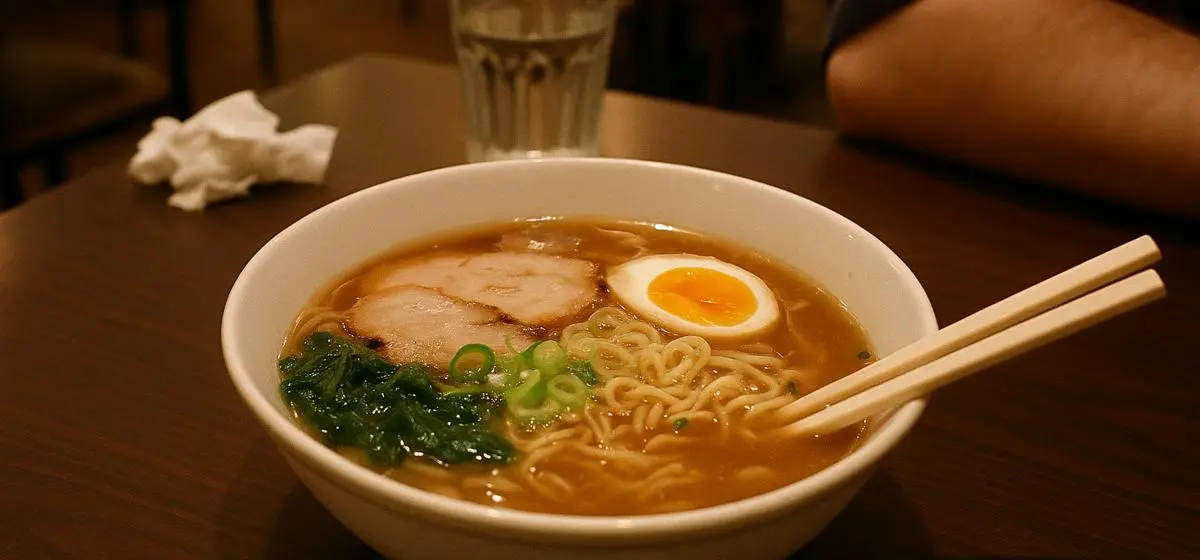
tags → dish 100, food 100, meal 100
caption → "a bowl of soup sitting on a table"
smart_crop → fits the card layout




How a user-generated content pipeline processes a submission
One submission, six operations, and a published card image. Every step is a shipped task. A photo upload API gets you to step zero of this list.

Off-center, cluttered, a stranger’s elbow in the shot, no alt text, and several megabytes. A completely typical submission.

Screened, categorized, captioned for screen readers, cropped to the card, stripped of metadata, and delivered in the format the browser asked for.
Screen user uploads for unsafe content and viruses
Screen it
The sfw task scores the submission before it reaches your storage. On this photo it returns { “sfw”: true } and the pipeline continues.
That is the user generated content moderation gate. Review moderation on written submissions works the same way, with a sentiment score in place of the sfw score.
Thresholds, video moderation, quarantine, and the human review queue are covered in full on the moderation page.
Check it is safe to open
Screening for unsafe imagery answers whether a file is safe to look at. Virus scanning answers whether it is safe to open, which matters the moment your product lets users attach anything other than a photo.
It runs as a step in the same Workflow, before the file reaches your storage, so an infected upload is quarantined rather than served.
Make user-generated images searchable with auto-tagging
tags returns content labels with confidence scores, which become search facets, category routing, and policy flags. On a food platform the difference between an untagged photo library and a tagged one is whether search works at all.
The same tags are what turn stored files into a searchable asset library, which is the DAM story from the other direction.
"dish": 100, "food": 100, "meal": 100,
"bowl": 99, "egg": 99, "cup": 99,
"soup": 97, "person": 97,
"noodle soup": 94, "table": 90 } } }
caption/nOtTu7K0TSLs7JvEKEMv
{ "caption": "a bowl of soup sitting on a table" }
Generate alt text for user uploads with image captioning
The caption task is an image captioning API that returns a natural language description. Run it on every submission and you have automatic alt text across the whole feed, the cheapest accessibility improvement a UGC product can ship. An accessibility image audit on any feed lacking it returns the same finding every time.
Be honest about the ceiling. On this photo the caption is “a bowl of soup sitting on a table”, a fair description of a bowl of ramen and not the one a person would write. A machine caption is a floor rather than a substitute where the description carries weight, and that holds for every image alt text AI on the market.
Resize and smart-crop user images for feed and card layouts
One source handle, every variant your feed and card layouts need. It is the social media image resizer job, done at request time rather than at upload time.

Takes the middle of the frame, which here is half a bowl and a napkin.
Finds the subject and frames it, from the same source, for whatever aspect the layout needs.
# WebP, AVIF, or JPEG
# per Accept header
no_metadata/
# and not their GPS
Format negotiated per browser, metadata stripped, cached at the edge.
Run the UGC pipeline automatically on every upload
A Workflow runs the chain on every submission and branches on the results, with the gray zone going to a human review queue by webhook. Automated screening triages the volume. People still decide the ambiguous cases, and any moderation system that claims otherwise fails in production and in legal review.
Frequently asked questions about UGC pipelines
What is a UGC pipeline?
A UGC pipeline is the sequence of checks and transformations applied to a user submission between upload and publication. A Filestack UGC pipeline chains safety screening, tagging, captioning, metadata stripping, and reformatting into one flow so nothing is published unprocessed.
How do I moderate user-uploaded images?
The sfw task returns a safe-for-work score at upload, before the file reaches your storage or your users, and a Workflow acts on it. Moderation is covered in depth on the content moderation page; here it is the first step of the publishing chain.
Can I stop users uploading malicious files?
Yes. Virus scanning runs as a step in the same Workflow, before the file reaches your storage, so an infected upload is quarantined rather than stored and served. It matters as soon as your product accepts anything beyond images.
How do I generate alt text for user uploads?
The caption task produces a natural language description of the image, which you can use as alt text. Machine captions are a floor rather than a replacement for a considered human description, but every image having a caption is a large improvement on most images having none.
Can it detect duplicate or reposted images?
No. There is no reverse image search API in this chain and no duplicate image detection, so a submission is never matched against images the platform has already seen. If reposts and lifted photos are your problem, pair this chain with a perceptual hashing service.
How do I strip location data from user photos?
The no_metadata operation removes EXIF, IPTC, XMP, and color profile data, including the GPS coordinates phones embed. On a UGC platform that is the difference between publishing a photo and publishing where the person who took it lives.